Building a CI/CD Pipeline with Dagger That Deploys to Kubernetes
View on GitHubMost CI/CD pipelines are written in YAML — declarative, platform-specific, and impossible to test locally. If you have ever stared at a 400-line GitHub Actions workflow trying to figure out why the deploy step failed, only to push another commit and wait 12 minutes to find out you missed a dash, you understand the problem. Dagger takes a different approach: your pipeline is real code, it runs in containers, and it works the same on your laptop as it does in CI. We built a complete six-stage pipeline using Dagger's TypeScript SDK that lints, tests, builds, publishes, and deploys a containerized application to Kubernetes via Helm — and it runs identically in local development and in GitHub Actions. The pipeline supports two deployment targets: a local Kind cluster for development and AWS EKS for production, with the same pipeline code driving both. Infrastructure is provisioned via AWS CDK, and GitHub Actions handles the full promotion workflow from dev through staging to production.
Why Dagger Over Traditional CI/CD
Traditional CI pipelines couple your build logic to a specific platform. A GitHub Actions workflow does not run in GitLab CI. A Jenkinsfile does not run in CircleCI. When you switch providers — or when you need to debug a pipeline failure locally — you are starting from scratch.
Dagger solves this by running every pipeline step inside containers orchestrated by the Dagger Engine. Your pipeline is a TypeScript (or Go, or Python) program that uses the Dagger SDK to build containers, run commands, and push artifacts. The Dagger Engine handles container execution, caching, and parallelism. The same pipeline script runs locally via dagger run and in any CI system that can run Docker.
The practical benefits are immediate: you can iterate on your pipeline without pushing commits, you get reproducible builds across environments, and your pipeline logic is testable code rather than declarative YAML.
Architecture Overview
The pipeline has six stages that execute sequentially, deploying to a Kubernetes cluster using Helm:
Lint → Test → Chart Lint → Build & Push → Deploy → Helm Test
A single DEPLOYMENT_TARGET environment variable controls whether the pipeline targets a local Kind cluster or an AWS EKS cluster. When targeting Kind, images push to a local registry at localhost:5001 and deploy to the default namespace. When targeting EKS, images push to Amazon ECR, and the pipeline deploys sequentially to namespace-isolated environments — dev, staging, and production — each with its own Helm values overlay.
The key components:
- Dagger TypeScript SDK — Pipeline orchestration in TypeScript
- Kind cluster — Local Kubernetes for development
- AWS EKS — Production Kubernetes with namespace-per-environment isolation
- AWS CDK — Infrastructure as code for the EKS cluster, VPC, ECR, and ALB controller
- Local Docker registry / Amazon ECR — Image and Helm chart OCI storage
- Helm — Application deployment and lifecycle management
- GitHub Actions — CI validation and environment promotion workflows
- Environment overlays — Progressive configuration from dev to production
Setting Up the Local Environment
Before running the pipeline, you need a Kubernetes cluster and a container registry. Our setup script handles this idempotently:
# Create a Kind cluster with ingress support
kind create cluster --name dagger-demo --config kind.yaml

# Start a local Docker registry
docker run -d --restart=always -p 5001:5000 --name kind-registry registry:2

# Connect the registry to the Kind network
docker network connect kind kind-registry
The Kind configuration maps ports 80 and 443 from the cluster to the host for Ingress access, and configures containerd to pull images from the local registry:
kind: Cluster
apiVersion: kind.x-k8s.io/v1alpha4
nodes:
  - role: control-plane
    kubeadmConfigPatches:
      - |
        kind: InitConfiguration
        nodeRegistration:
          kubeletExtraArgs:
            node-labels: "ingress-ready=true"
    extraPortMappings:
      - containerPort: 80
        hostPort: 80
      - containerPort: 443
        hostPort: 443
containerdConfigPatches:
  - |-
    [plugins."io.containerd.grpc.v1.cri".registry]
      config_path = "/etc/containerd/certs.d"
The registry runs as a standard Docker container. Inside the Kind cluster, containerd resolves localhost:5001 to the registry container on the shared Docker network. This means the same image reference works from the host machine and from within Kubernetes pods.
The Dagger Pipeline
The pipeline lives in dagger/src/index.ts and uses the Dagger TypeScript SDK. Each stage is a function that uses the Dagger client to create containers, mount source code, and execute commands.
Stage 1 and 2: Lint and Test
The lint and test stages run inside isolated Node.js containers. Dagger mounts the project source code into the container, installs dependencies, and runs the commands:
async function lint(client: Client): Promise<void> {
  const src = client.host().directory(".", { exclude: ["node_modules", "dist", "dagger"] });
  await client
    .container()
    .from("node:22-alpine")
    .withDirectory("/app", src)
    .withWorkdir("/app")
    .withExec(["npm", "ci"])
    .withExec(["npm", "run", "lint"])
    .sync();
}
This is where Dagger's model pays off. The lint step runs in the exact same Node.js 22 Alpine container whether you execute it on your laptop or in GitHub Actions. No "works on my machine" surprises. The exclude parameter keeps node_modules and build artifacts out of the container context, and Dagger caches the npm ci layer automatically.
The test stage follows the same pattern, running npm run test (Vitest) in an identical container.
Stage 3: Chart Lint
Before building anything, the pipeline validates the Helm chart against every environment's values file:
async function chartLint(): Promise<void> {
  execSync(`helm lint ${helmChartDir}`, { stdio: "inherit" });

  const envFiles = readdirSync(environmentsDir).filter((f) =>
    f.endsWith(".yaml")
  );
  for (const envFile of envFiles) {
    const valuesPath = resolve(environmentsDir, envFile);
    execSync(`helm lint ${helmChartDir} -f ${valuesPath}`, {
      stdio: "inherit",
    });
  }
}
Rather than hardcoding a list of environments, the function discovers all .yaml files in the environments/ directory. This means adding a new environment overlay — like eks-staging.yaml — automatically includes it in lint validation. Catching template rendering errors against every overlay prevents configuration drift from breaking environments you did not explicitly test.
Stage 4: Build and Push
The build stage constructs a Docker image using the project's multi-stage Dockerfile and pushes both the image and the Helm chart to the registry. When targeting EKS, the pipeline authenticates with ECR before pushing:
// Registry selection based on deployment target
const REGISTRY =
  DEPLOYMENT_TARGET === "eks"
    ? `${AWS_ACCOUNT_ID}.dkr.ecr.${AWS_REGION}.amazonaws.com`
    : "localhost:5001";
const IMAGE_NAME =
  DEPLOYMENT_TARGET === "eks"
    ? ECR_REPO_URI
    : `${REGISTRY}/sample-app`;

async function build(): Promise<string> {
  if (DEPLOYMENT_TARGET === "eks") {
    ecrLogin();
    helmLoginEcr();
  }

  execSync(`docker build -t ${FULL_IMAGE} ${projectRoot}`, {
    stdio: "inherit",
  });
  execSync(`docker push ${FULL_IMAGE}`, { stdio: "inherit" });

  execSync(`helm package ${helmChartDir} --destination /tmp`, {
    stdio: "inherit",
  });
  execSync(`helm push /tmp/sample-app-*.tgz ${CHART_REPO}`, {
    stdio: "inherit",
  });

  return FULL_IMAGE;
}
The registry, image name, and chart repository are all derived from the DEPLOYMENT_TARGET variable. For Kind, images go to localhost:5001. For EKS, they go to ECR. The ecrLogin() and helmLoginEcr() functions use aws ecr get-login-password to authenticate both Docker and Helm with the ECR registry. The Helm chart is published as an OCI artifact alongside the container image — no separate chart repository needed.
The Dockerfile uses a multi-stage build: a builder stage compiles TypeScript, and the production stage copies only the compiled JavaScript and production dependencies. The final image runs as a non-root user for security:
FROM node:22-alpine AS builder
WORKDIR /app
COPY package.json package-lock.json* ./
RUN npm ci
COPY tsconfig.json ./
COPY src/ ./src/
RUN npm run build

FROM node:22-alpine AS production
WORKDIR /app
ENV NODE_ENV=production
COPY package.json package-lock.json* ./
RUN npm ci --omit=dev && npm cache clean --force
COPY --from=builder /app/dist ./dist
RUN addgroup -g 1001 -S appgroup && \
    adduser -S appuser -u 1001 -G appgroup
USER appuser
EXPOSE 3000
CMD ["node", "dist/index.js"]
Stage 5: Deploy
Deployment uses helm upgrade --install with the OCI chart reference and an environment-specific values overlay. When targeting EKS, the pipeline creates the target namespace, selects the correct values file, and substitutes the ECR repository URI:
async function deploy(env?: string): Promise<void> {
  const targetEnv = env || DEPLOY_ENV;
  const valuesFile = getEnvironmentFile(targetEnv);
  const resolvedValuesFile = substituteEcrUri(valuesFile);

  const namespaceArgs: string[] = [];
  if (DEPLOYMENT_TARGET === "eks") {
    execSync(
      `kubectl create namespace ${targetEnv} --dry-run=client -o yaml | kubectl apply -f -`,
      { stdio: "inherit" }
    );
    namespaceArgs.push(`--namespace ${targetEnv}`);
  }

  const releaseName =
    DEPLOYMENT_TARGET === "eks" ? `sample-app-${targetEnv}` : "sample-app";

  const helmCmd = [
    `helm upgrade --install ${releaseName}`,
    `${CHART_REPO}/sample-app`,
    `-f ${resolvedValuesFile}`,
    `--set image.tag=${IMAGE_TAG}`,
    ...namespaceArgs,
    "--wait",
    "--timeout 120s",
  ].join(" ");

  execSync(helmCmd, { stdio: "inherit" });
}
The getEnvironmentFile() function resolves to eks-dev.yaml or dev.yaml depending on the deployment target, and substituteEcrUri() replaces ${ECR_REPO_URI} placeholders in the values file with the actual ECR repository address. On EKS, each environment deploys to its own namespace with its own Helm release name (sample-app-dev, sample-app-staging, sample-app-prod). The --wait flag blocks until all pods are ready, so the pipeline fails immediately if the deployment does not become healthy.
Stage 6: Helm Test
The final stage runs a Helm test hook — a pod that curls the application's health endpoints from inside the cluster:
apiVersion: v1
kind: Pod
metadata:
  annotations:
    "helm.sh/hook": test
    "helm.sh/hook-delete-policy": before-hook-creation,hook-succeeded
spec:
  restartPolicy: Never
  containers:
    - name: health-check
      image: curlimages/curl:8.11.1
      command: ["sh", "-c"]
      args:
        - |
          curl -sf http://sample-app:80/health || exit 1
          curl -sf http://sample-app:80/health/ready || exit 1
          curl -sf http://sample-app:80/health/live || exit 1
This validates that the deployed application is actually reachable and responding correctly from within the cluster network. If the health check fails, helm test returns a non-zero exit code and the pipeline fails.
Multi-Environment Configuration
The Helm chart is built once and deployed with different values per environment. This is the "build once, deploy many" pattern that prevents configuration from leaking between environments.
There are two sets of overlays: one for the local Kind cluster and one for EKS. The Kind overlays (dev.yaml, staging.yaml, prod.yaml) use local registries and Traefik ingress. The EKS overlays (eks-dev.yaml, eks-staging.yaml, eks-prod.yaml) use ECR image references and ALB ingress annotations. The pipeline selects the correct set automatically based on DEPLOYMENT_TARGET.
Three tiers define a progressive security and resilience posture:
Dev — Single replica, minimal resources, no network restrictions. Optimized for fast iteration:
replicaCount: 1
resources:
  requests:
    cpu: 50m
    memory: 64Mi
hpa:
  enabled: false
networkPolicy:
  enabled: false
Staging — Two replicas with HPA, a Pod Disruption Budget, and realistic resource limits. Mirrors production topology at smaller scale:
replicaCount: 2
hpa:
  enabled: true
  minReplicas: 2
  maxReplicas: 5
pdb:
  enabled: true
  minAvailable: 1
Production — Three replicas minimum, HPA scaling to ten, NetworkPolicy restricting traffic, read-only filesystem, and all Linux capabilities dropped:
replicaCount: 3
hpa:
  enabled: true
  minReplicas: 3
  maxReplicas: 10
networkPolicy:
  enabled: true
containerSecurityContext:
  readOnlyRootFilesystem: true
  allowPrivilegeEscalation: false
  capabilities:
    drop: ["ALL"]
The EKS overlays additionally configure ALB ingress via the AWS Load Balancer Controller:
ingress:
  enabled: true
  className: alb
  annotations:
    alb.ingress.kubernetes.io/scheme: internet-facing
    alb.ingress.kubernetes.io/target-type: ip
    alb.ingress.kubernetes.io/healthcheck-path: /health
Switching from local Kind to EKS is a one-variable change: DEPLOYMENT_TARGET=eks. The pipeline handles registry authentication, environment file selection, and namespace management automatically.
Running the Pipeline
With the local Kind environment set up, the full pipeline runs with a single command:
cd dagger && npm run pipeline
This executes all six stages sequentially. You can also run individual stages for faster feedback during development:
npm run pipeline:lint       # ESLint only
npm run pipeline:test       # Vitest only
npm run pipeline:chart-lint # Helm validation
npm run pipeline:build      # Build and push artifacts
npm run pipeline:deploy     # Helm deploy
npm run pipeline:helm-test  # In-cluster health check
To deploy to a different environment or with a specific image tag:
IMAGE_TAG=v1.2.0 DEPLOY_ENV=staging npm run pipeline
For EKS, provision the infrastructure first, then source the generated environment file:
./scripts/setup-eks.sh       # Deploy VPC, EKS cluster, ECR via CDK
source .env.eks              # Export DEPLOYMENT_TARGET, ECR_REPO_URI, etc.
cd dagger && npm run pipeline
When DEPLOYMENT_TARGET=eks, the pipeline deploys to all three environments sequentially — dev, staging, and production — running Helm tests after each:
source .env.eks
cd dagger && npm run pipeline:deploy-all
EKS Infrastructure with CDK
The EKS cluster and its supporting infrastructure are defined in AWS CDK (TypeScript), versioned alongside the application code. A single CDK stack provisions everything the pipeline needs:
// VPC with public and private subnets across 2 AZs
const vpc = new ec2.Vpc(this, "EksVpc", {
  maxAzs: 2,
  natGateways: 1,
});

// ECR repository for Docker images and Helm charts
const ecrRepo = new ecr.Repository(this, "SampleAppRepo", {
  repositoryName: "sample-app",
  removalPolicy: cdk.RemovalPolicy.DESTROY,
});

// EKS cluster with managed node group
const cluster = new eks.Cluster(this, "EksCluster", {
  clusterName: "dagger-demo-eks",
  version: eks.KubernetesVersion.V1_31,
  vpc,
  defaultCapacity: 0,
});

cluster.addNodegroupCapacity("DefaultNodeGroup", {
  instanceTypes: [new ec2.InstanceType("t3.medium")],
  minSize: 2,
  maxSize: 5,
});
The stack also installs the AWS Load Balancer Controller via Helm with IRSA (IAM Roles for Service Accounts) so that Kubernetes Ingress resources automatically provision ALBs. Three namespaces — dev, staging, prod — are created as part of the stack, giving each environment network isolation within the same cluster.
A setup script wraps the CDK deployment and writes a .env.eks file with all the environment variables the pipeline needs:
./scripts/setup-eks.sh
# → Deploys CDK stack
# → Configures kubectl context
# → Writes .env.eks with DEPLOYMENT_TARGET, ECR_REPO_URI, etc.
Teardown is equally automated — the script deletes Kubernetes ingress resources first (to clean up ALBs), then destroys the CDK stack.
Moving to Production CI with GitHub Actions
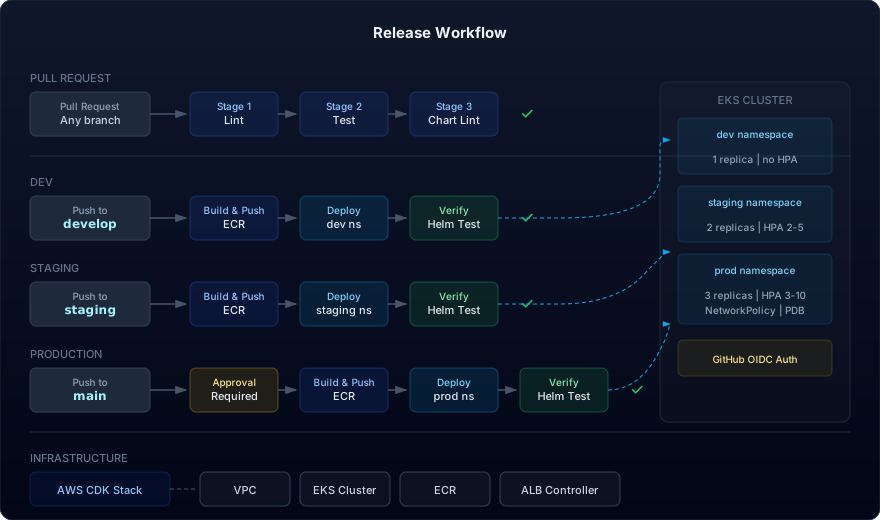
The local pipeline translates directly to GitHub Actions. The CI and deployment workflows call the same Dagger pipeline stages — the only differences are the registry (ECR instead of localhost) and the addition of OIDC-based AWS authentication.
CI: Pull Request Validation
A CI workflow runs on every pull request targeting the develop, staging, or main branches. It validates the code without deploying:
name: CI
on:
  pull_request:
    branches: [develop, staging, main]

jobs:
  validate:
    runs-on: ubuntu-latest
    steps:
      - uses: actions/checkout@v4
      - uses: actions/setup-node@v4
        with:
          node-version: "22"
      - run: npm ci
      - run: cd dagger && npm ci
      - uses: dagger/dagger-for-github@v7
        with:
          install-only: true
      - run: cd dagger && npm run pipeline:lint
      - run: cd dagger && npm run pipeline:test
      - run: cd dagger && npm run pipeline:chart-lint
This runs the first three pipeline stages — lint, test, and chart lint — ensuring code quality and Helm chart validity before any merge.
Deploy: Reusable Workflow
Deployment is handled by a reusable workflow that accepts an environment name and a deploy target. Each environment-specific workflow calls this shared workflow, keeping deployment logic DRY:
name: Deploy (reusable)
on:
  workflow_call:
    inputs:
      environment:
        required: true
        type: string
      deploy_env:
        required: true
        type: string

permissions:
  id-token: write
  contents: read

jobs:
  deploy:
    runs-on: ubuntu-latest
    environment: ${{ inputs.environment }}
    steps:
      - uses: actions/checkout@v4
      - uses: aws-actions/configure-aws-credentials@v4
        with:
          role-to-assume: ${{ secrets.AWS_ROLE_TO_ASSUME }}
          aws-region: ${{ secrets.AWS_REGION }}
      - uses: aws-actions/amazon-ecr-login@v2
      - run: aws eks update-kubeconfig --name "${{ secrets.EKS_CLUSTER_NAME }}"
      - run: cd dagger && npm run pipeline:build
        env:
          DEPLOYMENT_TARGET: eks
          AWS_ACCOUNT_ID: ${{ secrets.AWS_ACCOUNT_ID }}
          ECR_REPO_URI: ${{ secrets.ECR_REPO_URI }}
      - run: cd dagger && npm run pipeline:deploy
        env:
          DEPLOY_ENV: ${{ inputs.deploy_env }}
          DEPLOYMENT_TARGET: eks
      - run: cd dagger && npm run pipeline:helm-test
        env:
          DEPLOY_ENV: ${{ inputs.deploy_env }}
          DEPLOYMENT_TARGET: eks
AWS authentication uses OIDC federation — no long-lived access keys stored as secrets. GitHub's OIDC provider assumes an IAM role that has permissions to push to ECR and deploy to the EKS cluster.
Branch-Based Promotion
Three trigger workflows map branches to environments:
develop→ auto-deploy to devstaging→ auto-deploy to stagingmain→ deploy to production (with GitHub Environment protection rules for required reviewers)
# deploy-dev.yaml
name: Deploy Dev
on:
  push:
    branches: [develop]
jobs:
  deploy:
    uses: ./.github/workflows/deploy.yaml
    with:
      environment: dev
      deploy_env: dev
    secrets: inherit
The production workflow is identical except it targets the main branch and the production GitHub Environment. Adding a required reviewer to the production environment in GitHub settings gates production deploys behind manual approval — without any changes to the workflow files.
This branch model means a feature goes through develop → staging → main, with the same Dagger pipeline running at each stage and the same Docker image and Helm chart flowing through all environments.
Practical Takeaways
Writing your CI/CD pipeline as real code instead of platform-specific YAML changes the development experience fundamentally. You get IDE autocomplete, type checking, and the ability to run your entire pipeline locally before pushing. Dagger's container-based execution model ensures reproducibility, and the caching layer makes subsequent runs fast.
The dual-target pattern — DEPLOYMENT_TARGET=kind for local development, DEPLOYMENT_TARGET=eks for production — means the same pipeline code drives both environments. You test the full pipeline locally against Kind, then the exact same stages run in GitHub Actions against EKS. No translating between local scripts and CI YAML.
Pairing Dagger with Helm and environment-specific overlays gives you a deployment model that scales from a local Kind cluster to a multi-environment EKS setup without changing the pipeline logic. The chart is built once, tested once, and deployed with progressively stricter configuration — dev gets a single replica with no restrictions, production gets HPA, NetworkPolicy, read-only filesystems, and approval gates.
Defining the EKS infrastructure in CDK alongside the application code means the cluster, VPC, ECR repository, and load balancer controller are all version-controlled and reproducible. A single setup-eks.sh script stands up the entire environment, and teardown-eks.sh tears it down cleanly.
If your team is spending more time debugging CI YAML than shipping features, this approach is worth evaluating. The initial setup investment pays back quickly once you stop treating your pipeline as a second-class citizen.