Four AI Demos on Cloudflare's Free Tier: How We Built Them
We built four working AI demos, each a small site for a made-up business, and they all run inside Cloudflare's free allowances. Each one is a single Cloudflare Worker built with TanStack Start, and all four share one free allowance of 10,000 Workers AI Neurons a day. A typical request costs between 17 and 130 Neurons, which at list price is a fraction of a cent.
You can try them:
- Customer Answers: questions answered from a company's own documents, with citations.
- Paperwork Inbox: invoices, receipts, and forms read into a table and checked.
- Quote Desk: replies to customer inquiries drafted by an agent and approved by a person.
- Shop Assistant: an online shop with an assistant that finds products from a plain description.
This post covers how they are built: the stack, the parts all four share, how each demo works, what each request costs, and what we would do differently.
Why Build Demos at All?
Describing AI work in the abstract is hard. "AI reads your invoices" means little until you watch a model copy an invoice into a table and see a check catch a wrong subtotal. So we built the four jobs we are asked about most often, and made them public.
We set three constraints:
- Cloudflare only. The demos run on the stack we use for client work, and there is nothing else to operate.
- Free, or close to it. A demo that costs money every time someone clicks will be switched off the first time it gets attention.
- Made-up businesses. No client data, and nothing a visitor types can affect anything real.
The Stack
| Layer | Choice |
|---|---|
| Runtime | Cloudflare Workers |
| Framework | TanStack Start (React 19, TanStack Router), server-rendered |
| Build | Vite with @cloudflare/vite-plugin, so development runs inside workerd |
| Sessions | Cloudflare Agents SDK on Durable Objects with SQLite storage |
| AI | Workers AI: mistral-small-3.1-24b-instruct for chat, vision, and tool calling; bge-m3 for embeddings. Every model call goes through AI Gateway |
| Data | D1, AI Search, and Workflows, each used only where a demo needs it |
| Bot check | Turnstile |
| Repo | A Bun workspace: four apps and two shared packages |
One model does chat, vision, and tool calling in all four demos. It supports all three, plus JSON-schema output, on Workers AI. Using one model kept the prompts and the cost comparisons consistent.
Not every demo uses every product. The Shop Assistant needs only Workers AI and Durable Objects. The Paperwork Inbox uses the most: a Workflow, D1, and the assets binding.
| Product | Answers | Paperwork | Quotes | Shop |
|---|---|---|---|---|
| Workers, Durable Objects, Workers AI, Turnstile | ● | ● | ● | ● |
| AI Search | ● | |||
| D1 | ● | ● | ||
| Workflows | ● | ● | ||
| Cron Triggers | ● |
What All Four Share
One Worker, One Durable Object per Visitor
Each demo's Worker entry wraps TanStack Start's handler. Page requests are server-rendered. Requests under /agents/ go to the Agents SDK, which routes them to a Durable Object.

There are no accounts. The browser generates a UUID, keeps it in localStorage, and opens a WebSocket to /agents/<agent>/<uuid>. That UUID names the visitor's own Durable Object, which holds everything about the session: the conversation, the cart, the uploaded image, the state of each inquiry.
The agent keeps a state object. Calling setState saves it to the object's SQLite storage and pushes it to the page over the socket. Almost everything a visitor sees is a rendering of that state, which removes a whole class of "the page and the server disagree" bugs. Streamed text is the one exception: chunks go out as small messages, and the final text arrives in a state update.
Each session deletes itself. On the first connection the agent schedules an alarm for 24 hours later, and that alarm removes the object's storage along with any rows it wrote to D1.
A Ledger That Keeps the Bill at Zero
A public demo that calls a model on every click is an open invitation to spend someone's money. Each demo has a second Durable Object, the Ledger, with one instance for the whole demo. It counts Neurons spent per UTC day and stores saved results.
allowance(): Allowance {
  const budget = Number(this.env.DAILY_NEURON_BUDGET) || 0;
  const row = this.ctx.storage.sql.exec("SELECT neurons FROM usage WHERE day = ?", today()).toArray()[0];
  const spent = Number(row?.neurons ?? 0);
  return {
    usedPct: budget ? Math.min(100, Math.round((spent / budget) * 100)) : 100,
    resting: spent >= budget,
  };
}
A Durable Object handles one request at a time, so the counter needs no locking. Every costly action goes through four checks:

- Turnstile, once per session. The widget is invisible unless Cloudflare decides the visitor needs a challenge. Verification fails closed.
- Saved results. The built-in samples give the same result for everyone, so the first run is saved and later runs are replayed at no cost. The lookup comes before the caps, so the samples keep working after a limit is reached.
- A per-session cap on new model work.
- A daily budget per demo. The four budgets add up to 10,000 Neurons, the whole free allowance.
Saved results are keyed by a version: a hash of the documents or the catalogue, a prompt version number, and the model id. Change any of them and the old results are never read again.
Two Shared Packages
@entuit/kit holds the Worker-side code every demo uses: the Ledger, pricing, Turnstile verification, security headers, and two model helpers (one for JSON to a fixed schema, one for streamed text). @entuit/ui holds the design tokens and components from this site. Both are consumed as TypeScript source through the workspace, with no build step of their own.
Demo 1: Customer Answers
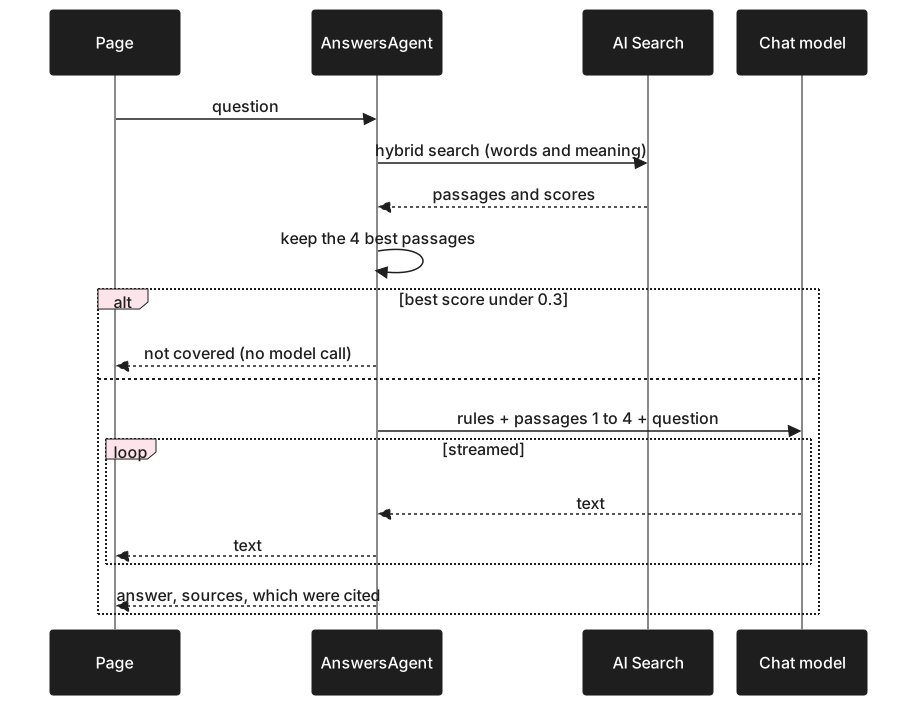
A visitor asks questions of a heating company's price list, warranty, and policies. This is retrieval-augmented generation: find the passages closest to the question, then have the model answer from those passages only.
Three decisions are worth explaining.
The documents are bundled into the Worker, and each passage is its own search item. Workers have no filesystem, so the Markdown files are imported at build time and split into passages at each heading. Each passage is uploaded to Cloudflare AI Search as a separate file, which does the embedding and runs hybrid search: exact words (a product name, a price) and meaning both count. The text shown as a source is looked up in the bundle by the item's key, so every result maps to exactly one passage.
The index records which version of the documents it holds. The bundle carries a hash of the documents, and the rebuild stores that hash once every passage has finished indexing. If someone deploys new documents and forgets to rebuild, the hashes differ and the Worker says "still being indexed". It never answers from stale passages.
"Not covered" is decided twice. If the best passage's vector similarity is under 0.3, the agent says the documents do not cover it and skips the model call entirely. Otherwise the model is told to reply with an exact sentinel string when the passages lack the answer. The streaming loop holds output back while it could still be the start of that sentinel, so the visitor never sees it.
Visitors can also paste a page of their own text. That text is embedded and stored in the session's own SQLite table and compared in a loop, so it never enters a shared index.
Demo 2: Paperwork Inbox
A visitor picks a sample invoice, receipt, or handwritten form, or uploads a photo. The page shows it move through four stages and end as a row in a table, with anything questionable marked for a person.
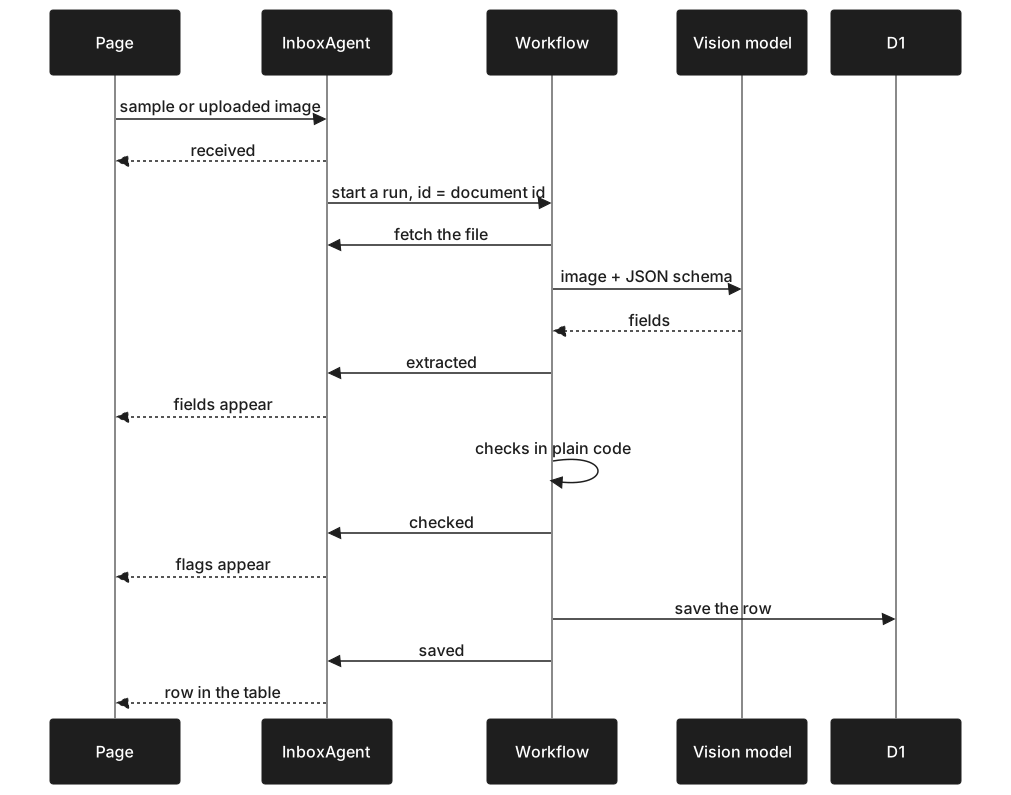
The model copies; code checks. The vision model gets the image and a JSON schema, and its instructions are blunt: copy every value exactly as printed, and never correct a number even if the arithmetic on the page is wrong. Then plain TypeScript checks that each line is quantity times unit price, the lines sum to the subtotal, the tax is 13% of the subtotal, and the total adds up. One sample invoice has a wrong subtotal on purpose. If the model "helpfully" fixed it, nobody would learn the supplier made a mistake.
const res = await env.AI.run(env.VISION_MODEL, {
  messages: [
    { role: "system", content: SYSTEM },
    { role: "user", content: [
      { type: "text", text: "Extract this document." },
      { type: "image_url", image_url: { url: `data:${mime};base64,${base64(image)}` } },
    ] },
  ],
  response_format: { type: "json_schema", json_schema: SCHEMA },
  max_tokens: 1500,
  temperature: 0,
});
A Workflow, started straight from the session agent. Starting a run returns at once, so the page shows "received" immediately while the work happens outside the request. The Workflow gives each of the three steps (read, check, save) its own retries, and a finished step is not run again if a later one fails. The document id is also the Workflow run id, so a document cannot be processed twice. We first put a Queue in front of it, then took it out: the Workflow already stores its input and retries, so the Queue only added a hop.
The Workflow reports to the session agent. After each step it calls a method on the visitor's Durable Object, which updates state, which updates the page. The agent also sets a three-minute watchdog, so a run that never reports back cannot leave the session stuck.
Demo 3: Quote Desk
A visitor plays the owner of a renovation company. Opening a customer inquiry starts an agent that looks up prices, open start dates, and policies, then drafts a reply. The owner edits, approves, rejects, or asks for a redraft. Nothing is sent without approval.
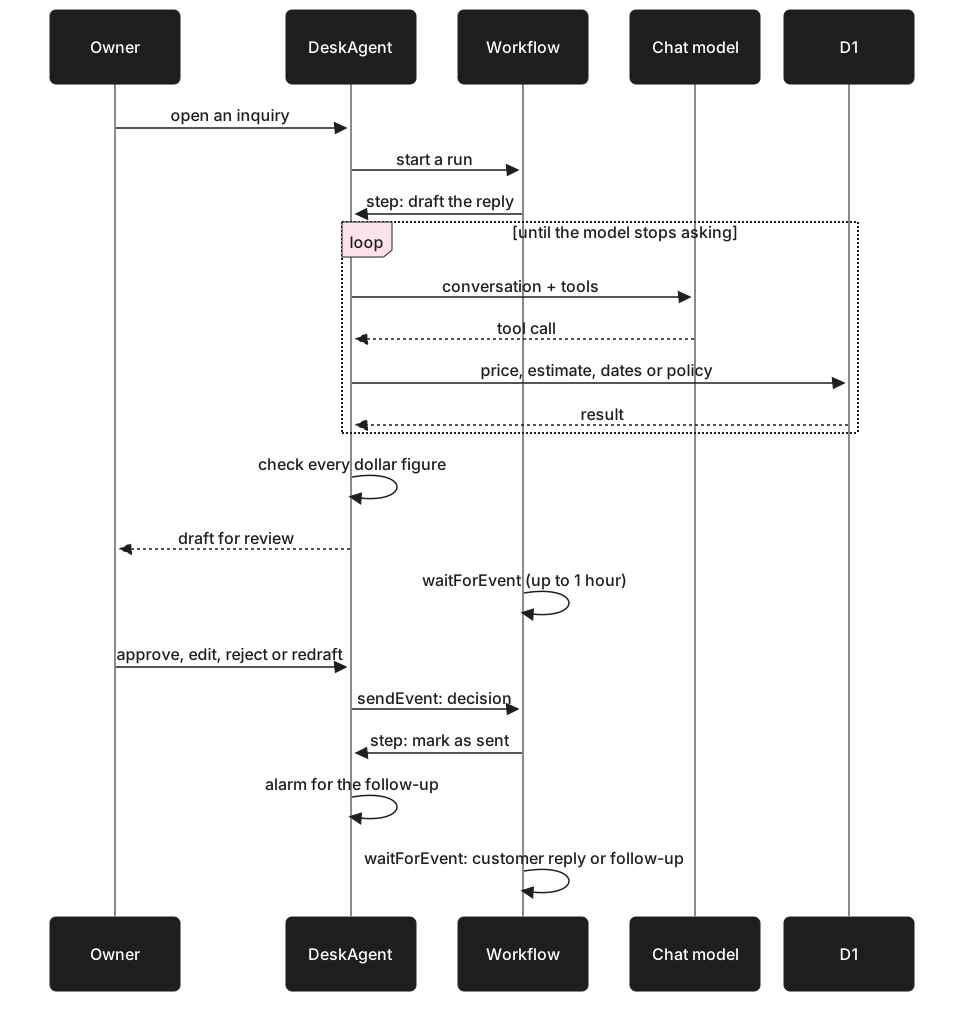
The model never does arithmetic. It has four tools, and each is a D1 query: lookup_prices, estimate, open_start_dates, and lookup_policy. The estimate tool takes price ids and quantities and returns every line amount, the subtotal, the tax, and the total. The model's job is to pick the right items and write the email.
Every dollar figure is checked. After the model writes a draft, code finds each dollar amount in the text and confirms that a tool returned that number. A second check catches a promised day or week when the calendar was never looked up. The agent runs these checks on itself and gets one chance to correct the draft. The page runs the same check again as the owner types, so a figure the owner adds by hand is marked too.
A Workflow waits on a person. The draft step is followed by waitForEvent, which suspends the run until the owner decides. Nothing is held open in the meantime.
const drafted = await step.do(`draft the reply (${round})`, opts, async () =>
  (await desk()).draft(inquiryId, round, instruction));

decision = (await step.waitForEvent<Decision>(`wait for the owner (${round})`, {
  type: "decision",
  timeout: "1 hour",
})).payload;
After an approved reply is marked as sent, a Durable Object alarm fires 30 seconds later, standing in for three days. If the customer has not answered, the agent drafts a follow-up for approval. If the original reply turned the work down, the model returns a sentinel and no follow-up is written.
Demo 4: Shop Assistant
A small plant shop with thirty products and an assistant. A visitor types "something for a dark apartment that's safe for my cat" and gets products that fit, with reasons.

The model understands and explains; code chooses. The first model call turns the message into a fixed JSON intent: the kind of message, plus any budget, pet, light, care, category, or size requirement the customer stated. Code then applies those as hard filters, ranks what is left by embedding similarity, and hands the top four to a second model call to explain. The assistant cannot recommend a product the shop does not sell, or quote a price the shop does not charge, because it never chooses products or prices.
When nothing fits, it says so. If no product passes every filter, the search drops one requirement at a time, in a fixed order with pet safety last, and tells the model which one was dropped. The reply opens by saying nothing meets all of it.
Cards follow the reply. Product cards are shown only for products the reply names, and their names and prices come from the catalogue, not from the model's text.
No database. Thirty products fit in the Worker bundle. Their thirty vectors are computed on the first search and kept as one value in the Ledger. A catalogue of thousands would move to Vectorize; this one does not need it.
What Does a Request Cost?
These are measured against the real Workers AI service during development. Workers AI lists $0.011 USD per 1,000 Neurons, and the first 10,000 a day are free.
| Action | Neurons | List price (USD) | Daily budget | New requests a day |
|---|---|---|---|---|
| An answer from documents | about 19 | $0.0002 | 2,000 | 30 (search cap) |
| Reading one document | 45 to 90 | $0.0005 to $0.001 | 3,000 | 35 to 65 |
| A first draft with a quote | about 130 | $0.0014 | 3,000 | about 20 |
| A redraft or follow-up | 15 to 30 | $0.0002 to $0.0003 | ||
| A shop message | 17 to 40 | $0.0002 to $0.0004 | 2,000 | 50 to 115 |
Replayed samples cost nothing and are not counted. The quote draft costs the most because each tool round resends the conversation so far. Answers is held to 30 new answers a day by a second cap: AI Search includes 1,000 searches a month, and 30 a day stays inside them.
These numbers are for a small model on Cloudflare's own inference. A client project that needs a larger hosted model will cost more per request, though the same structure applies: cap it, save what repeats, and show the cost. Our post on what AI costs a small business in Canada covers the wider picture.
What We Learned
Let the model copy, and convert in code. Asked to reformat dates as it read them, the vision model turned 2026 into 2023 and 2024. Asked to copy them exactly as written, it was reliable. A small parser now does the conversion, and flags a date such as 03/10/2026 that could be read two ways.
Tool calling on a small model needs a safety net. Asking for several tools in one turn sometimes produced output the platform rejected. The fix was to catch the failure and retry with an instruction to call one tool at a time. The self-correction round on quote drafts exists for the same reason.
Keep the model's job narrow. In every demo, the model reads, classifies, or writes. Code picks prices, runs arithmetic, filters products, writes to the database, and decides what is shown. That boundary is what makes the output trustworthy, and it is also what makes prompt injection mostly uninteresting: there is very little the model can be talked into doing.
Version your saved results. Early on, a prompt change appeared to do nothing because the old result was being replayed. Putting a prompt version, a content hash, and the model id in every key fixed it for good.
Session state as the source of truth is worth it. One state object, pushed to the page on every change, meant the Workflows, the alarms, and the page never needed their own view of what was happening.
What We Left Out
- No accounts, payment, or email. The Quote Desk marks replies as sent without sending them.
- Uploads are images only. A PDF would need rendering to an image first.
- No automated tests. Each demo has a command-line script that drives the real agent over a WebSocket, which is how we verified them.
- We have not yet measured whether server-rendering fits the 10 ms CPU limit on the Workers Free plan. If it does not, the $5 USD a month Workers Paid plan covers all four.
- The four budgets use the whole free allowance, so a busy day means the demos fall back to their saved samples until midnight UTC.
What This Means for a Real Project
The demos are small, but the structure is the one we use for client work: a narrow job for the model, checks in plain code, a person approving anything that leaves the building, and a visible cost per request. The parts that change are the data (your price list, your documents, your catalogue), the integrations (your inbox, your accounting system), and sometimes the model.
If one of these four jobs looks like something your team does by hand, see our fixed-price packages or book a free 30-minute call.